How it works
Upload a bank statement PDF
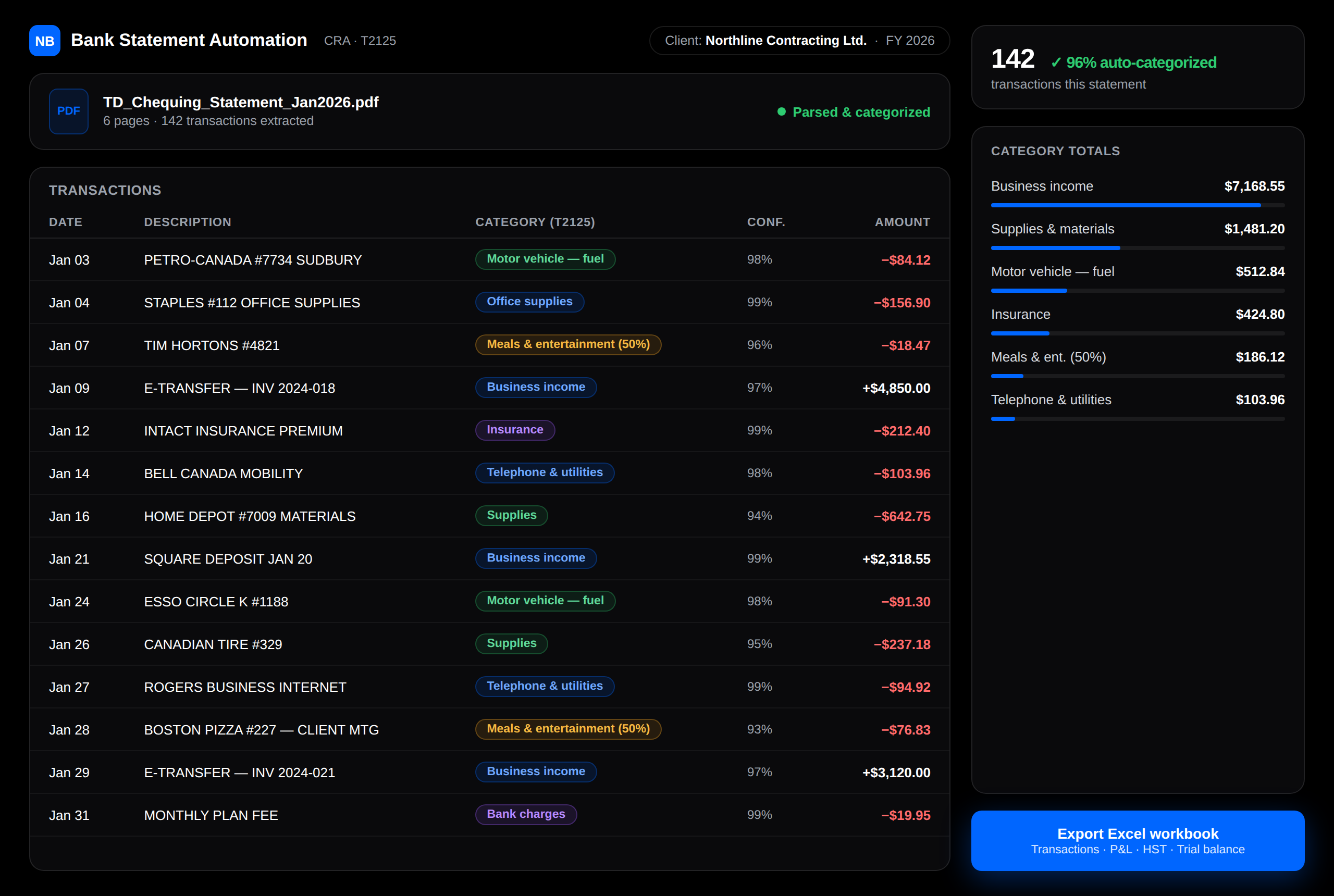
Drop in any Canadian bank statement — TD, RBC, Scotiabank, BMO, CIBC. The parser extracts every transaction with dates, descriptions, and amounts, straight from the PDF.
AI categorizes to CRA lines
Each transaction is matched to the right T2125 expense category — fuel, supplies, insurance, meals at 50%, and more — with a confidence score, so anything uncertain gets flagged for review instead of guessed.
Export a working-paper-ready Excel file
One click builds a clean multi-sheet workbook a preparer can use immediately — no retyping, no copy-paste, no manual coding of 142 rows.
What the export contains
Transactions
Every line item with date, description, category, and amount — filterable and audit-ready.
Profit & Loss
Income and expenses rolled up by T2125 category for the period.
HST Summary
HST collected and input tax credits, ready for return preparation.
Trial Balance
Debits and credits by account, tying the statement back to the books.